

While KoboToolbox is a popular choice for offline humanitarian surveys, many NGOs quickly run into both functional and financial hurdles. Kobo’s free plan is designed for individual users; organisations needing multi-user collaboration, team roles and higher data limits must pay for their Teams plan, starting at $289 per month. Despite the price tag, data remains locked in isolated survey batches that require hours of manual VLOOKUPs to match repeat participants. You can eliminate these operational silos and cost bottlenecks in three simple steps: centralise participant profiles into a single CRM, automate longitudinal progress tracking across survey rounds and generate continuous visual reports across all your programmes.
How It Works on Makerble
On Makerble, offline field data collection through our dedicated Android app works as part of an interconnected ecosystem. Rather than storing survey entries in isolated datasets, Makerble automatically links every response directly to individual beneficiary records. This makes longitudinal analysis effortless by joining up survey answers over time to demonstrate true "distance travelled". Field staff benefit from advanced form logic, such as conditional branching, skip logic and dynamic fields; while leadership teams enjoy live visual dashboards and flexible data import/export tools (via CSV, API and MCP) without needing complex external setups.
In-Depth Breakdown: Makerble vs. KoboToolbox
1. Longitudinal Analysis vs. Isolated Survey Batches
- KoboToolbox: Designed primarily for cross-sectional, point-in-time data collection. Linking baseline, midline, and endline surveys for a single beneficiary requires exporting datasets to Excel or SPSS and manually running complex VLOOKUPs or SQL joins on unique IDs.
- Makerble: Built natively around the participant journey. Responses collected via web, 2-way SMS or the Android app are linked automatically to the beneficiary's central Bio Profile. Progress charts update continuously as new survey rounds are submitted.
2. Intuitive Form Building vs. XLSForm Learning Curves
- KoboToolbox: Requires learning the syntax of XLSForm standards (working across multiple Excel tabs like survey choices and settings) for complex logic and skip rules. Editing deployed forms can easily disrupt dataset structures.
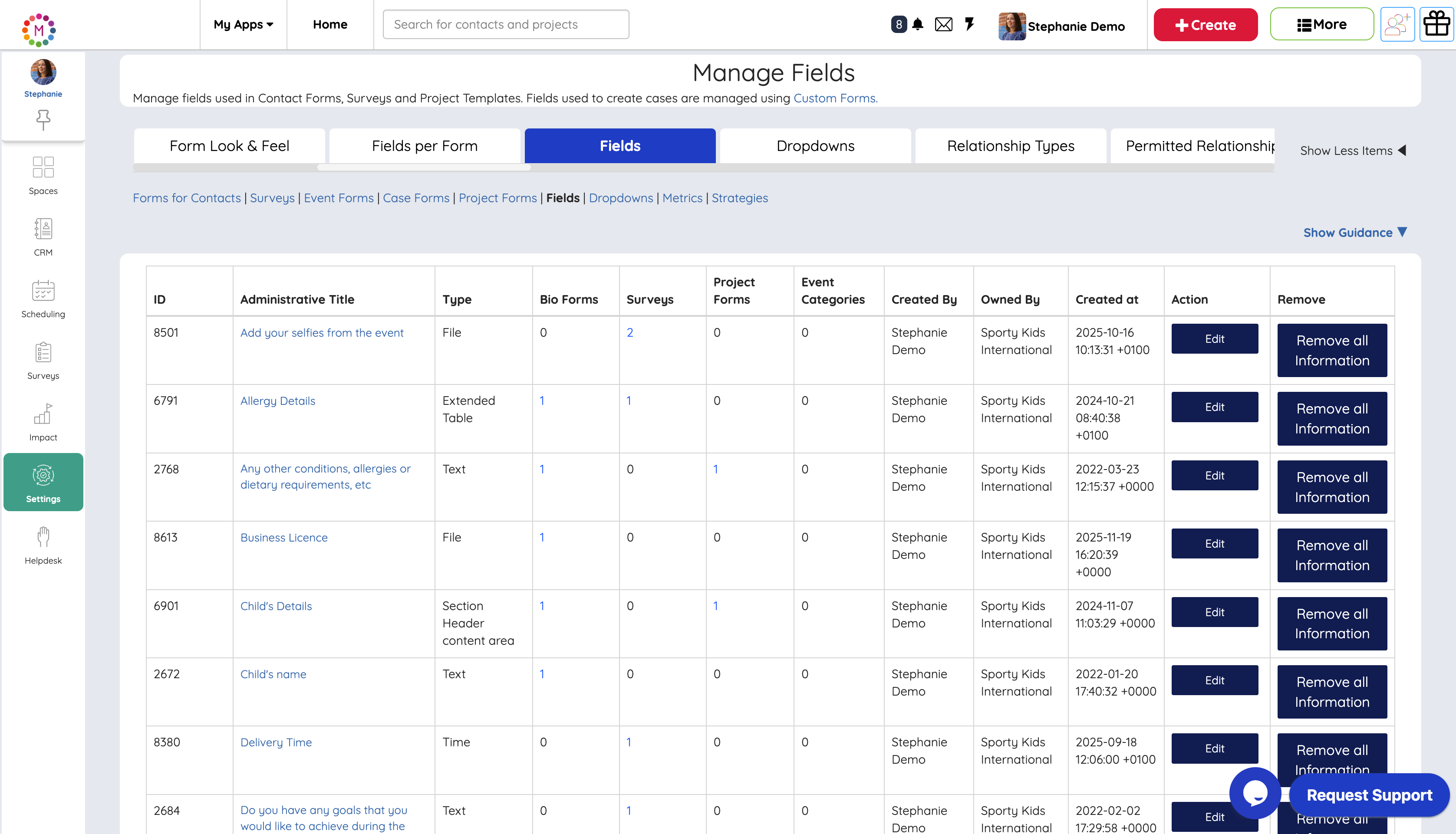
- Makerble: Uses a visual, no-code Designer tool with a centralized Fields Library. Teams can create custom fields once and reuse them across multiple forms to prevent duplication. Form changes can be made instantly without breaking historical data lineage.
3. Integrated CRM & Case Management vs. Data-Only Collection
- KoboToolbox: Strictly a survey collection engine. It lacks case notes, event scheduling, rotas, 2-way SMS messaging and task management.
- Makerble: An all-in-one platform combining survey data, case management, referral pathways, attendance tracking, internal team collaboration and reporting under one roof.
4. Out-of-the-Box Visual Reporting vs. External Dashboard Building
- KoboToolbox: Acts as a data collection tool, not a reporting engine. To visualize impact, track indicator targets, or build funder reports, you must export raw survey data into Excel, PowerBI, or Tableau and manually design dashboards from scratch.
- Makerble: Delivers instant visual reporting out of the box. The moment a survey is submitted in the field, real-time visual charts, target progress bars, and portfolio Albums update automaticallygiving staff and board members instant visibility without needing external BI software.
How the solutions compare side by side
Which System Is Right for You?
- Choose KoboToolbox if: You only need a basic, zero-cost survey tool for rapid crisis assessments, academic research, or short-term field studies where you do not need to manage ongoing participant relationships, run case management workflows, or track individual progress over time.
- Choose Makerble if: You want a future-proof impact platform that combines offline mobile data collection and advanced form logic with central CRM case management, simple longitudinal analysis, and instant visual reporting across all your projects.
You can get started on Makerble today using our accessible free tier and upgrade seamlessly as your team and funding grow. (This video explains how KoboToolbox relies on external XLSForm spreadsheet templates to build complex skip logic)
Already committed to using KoboToolbox? Get the best of both worlds
If your field team already relies heavily on KoboToolbox for large-scale enumerations, you can easily use both tools together:
- Use KoboToolbox for Initial Field Capture: Collect rapid, large-scale field assessments in extreme offline environments[cite: 2].
- Use Makerble for Ongoing Case Management & Reporting: Pass survey entries into Makerble via CSV imports or automated API webhooks[cite: 1].
- The Result: Kobo handles the rapid front-end data collection, while Makerble attaches entries to central client profiles, tracks longitudinal progress, and feeds visual dashboards for funders without manual spreadsheet work.
To find out more about how Makerble supports data collection, programme management, reporting and impact measurement for NGOs, book a demo or explore the platform.






.png)

%208.png)


.png)


